• Skip to primary navigation
  • Skip to main content
  • Skip to primary sidebar
  • Skip to footer

Quilty Love

A quilting creative blog

  • Home
  • Shop
  • Blog Posts
  • Wholesale
  • Categories
    • Completed Quilts
    • COURSES
    • Creative Business Posts
    • Free Quilt Patterns
    • Other quilty projects
    • Pattern Corrections
    • QUILT ALONGS
    • quilting tips and tricks
    • Tutorials
    • Uncategorized
  • ABOUT
  • SALE
  • CONTACT
  • Completed Quilts
    • Cake Dash Quilt
    • City Tiles
    • Classic Hearts Quilt Pattern
    • Classic Stars
    • Coins Quilt
    • Compass Star
    • Cozy Season Quilts
    • Crossroads
    • Cross Tile
    • Diamond Lanterns
    • Diamond Pop Quilt
    • Double the Plus
    • Expanding Stars
    • Fat Quarter Dash Quilt
    • Flying Quilt
    • Free Quilt Patterns
    • Geo Gems Quilt
    • Glowing
    • Happy Scallops quilt
    • Happy Stripes Quilt
    • Heart Gems
    • Heart Quilt
    • Hexie Framed Quilt
    • Hexie Pop Quilt
    • Home Run Quilt
    • Hopscotch II
    • Infinite Hearts Quilt
    • Jelly Rings Quilt
    • Jelly Stripes Quilt
    • Log Cabin Stars Quilt
    • Lucky Links Irish Chain
    • Lucky Log Cabins
    • Night Stars
    • North Star Quilt
    • Ombre Gems
    • Ombre Quilt
    • Patchwork Flying Geese Quilt
    • Patchwork Hearts Quilt
    • Plus and Minus Quilt
    • Plus Charmed Quilt
    • Plus Pop Quilt
    • Plus Squared
    • Quilty Arrows Quilt
    • Quilty Hearts quilt
    • Quilty Stars Quilt
    • Quilty Trees
    • Scrap Stash Plus Quilt
    • Scrappy Arrows Quilt
    • Scrappy Gems Quilt
    • Scrappy Hearts Quilt
    • Southwest Sunshine
    • Stained Glass Windows Quilt
    • Star Fall Quilt
    • Star Pop Quilt
    • Star Pop II quilt
    • Stepping Stars Quilt
    • Sweet Summertime
    • Tiled Stars Quilt
    • Triangle Hexies quilts
    • Triangle Peaks Quilt
    • Triangle Pop
    • Bags
    • Pillows
    • All other quilts
You are here: Home / Tutorials / Save time quilting: Cutting Shortcuts with the Stripology ruler

Save time quilting: Cutting Shortcuts with the Stripology ruler

January 19, 2018 By Emily@QuiltyLove

This post may contain affiliate links. I may receive commissions for purchases made through links in this post.

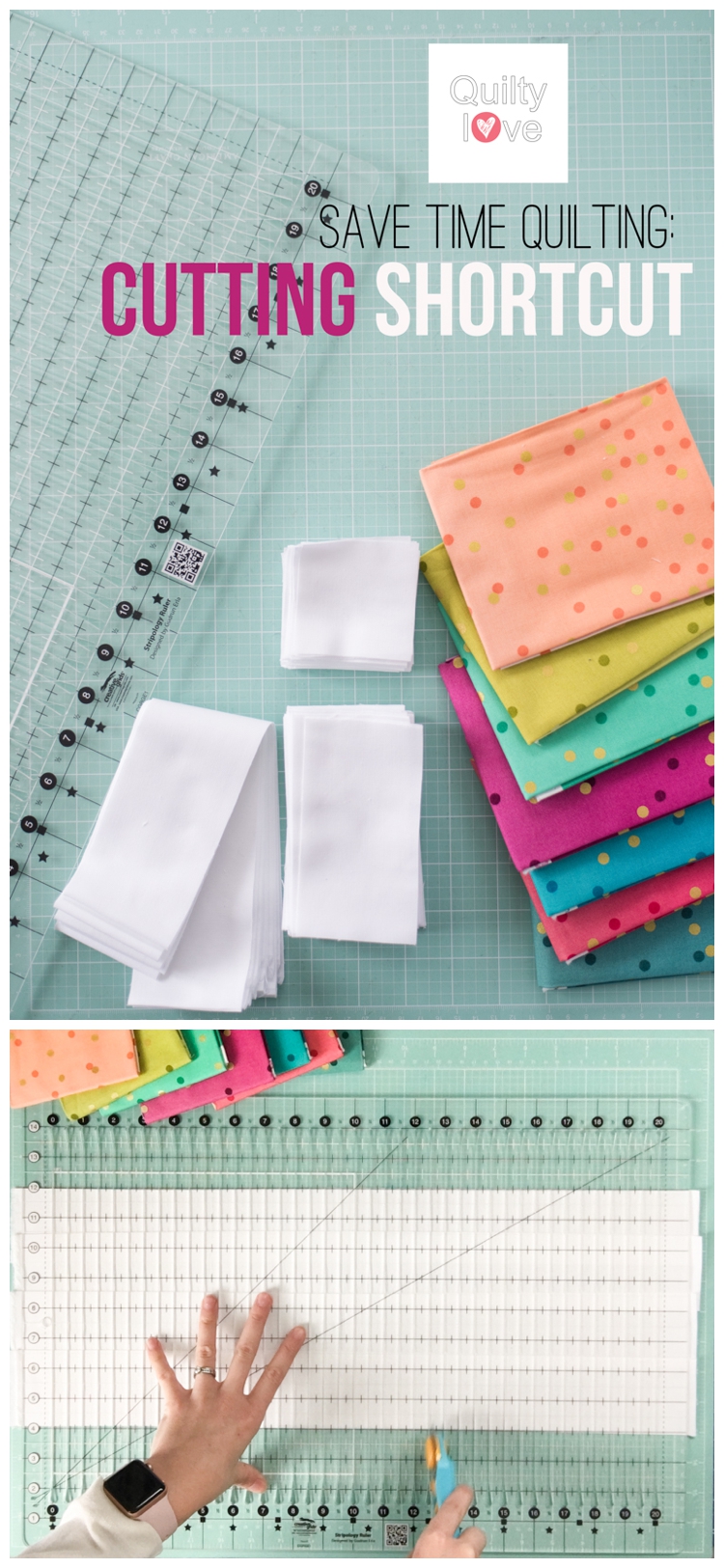
Finding tools and techniques that save time quilting means more quilts can be made!  That’s why I was pretty impressed with this quilt cutting time saver and wanted to share it with you all.Save time quilting with this cutting shortcut

I posted a short cutting video on Instagram a while back asking for fabric cutting shortcuts and people kept mentioning the Creative Grids Stripology ruler.  I had never heard of this so I immediately looked it up.

Holy Hannah this thing is clever!  I bought it instantly.

I have a tendency to make quilt designs with lots of little pieces…ha.  So the Stripology ruler has been such a time saver for me!  Need to cut 800 2.5in squares… umm yep, give me the ruler 😉

What is the Stripology Ruler?

The Stripology ruler is a quilting ruler that really speeds up fabric cutting.  It’s the perfect ruler for strips, small squares and skinny fabric strips like one inch.

How does the Stripology ruler work?

This quilt ruler is super handy because you place it once and make many cuts at once.  No lifting and shifting your ruler as you cut.  This also results in super accurate cutting!  If you want to see some improvement in your piecing, it starts with cutting!  Seriously!

My favorite thing to use the Stripology ruler is for 2.5in strips and 2.5in squares.  It is so amazingly fast at cutting these smaller sizes.

How to use the Stripology ruler to save time quilting step by step:

(Find video clips of this ruler in action down below.)

  • To cut a width of fabric like I do below, first fold it in half.

  • Line the folded fabric up on a line on your cutting mat.  It’s always a good idea to use the lines on your mat to keep things nice and straight.

  • Place the Stripology ruler over the folded fabric.  This is where I wish this ruler was tiiiny bit wider.  A folded width of fabric will juuust fit so be sure to center the ruler so the rotary cutter goes end to end here.
  • Use your cutting mat to line up a line on the ruler with a line on the mat.

  • Use your rotary cutter and start cutting!  This ruler is nice and non slip and is easy to read.  Common sizes are marked with shapes.  Just find the shape and cut.  No measuring, no counting, no thinking 😉

  • Continue cutting your specified size the whole way through.  I’m cutting 2.5in strips so I just cut on each square marking.

  • And now you have perfectly cut 2.5in strips!  You can cut 8 strips before adjusting the ruler.

Go from strips to squares

Now lets turn these 2.5in strips into 2.5in squares.  This is where the real magic happens 😉

  • Place your strips on your cutting mat.  Use the lines on your mat to place them nice and straight.

  • Continue placing the strips on the mat using the lines to keep them straight.  I overlap my strips so I can cut more of them at one time.

  • Carefully place the ruler over the strips the same as we did for the yardage.  Line up the ruler with lines on the mat.

  • Start on one edge and cut on the 2.5in marking the whole way through the ruler.

And BAM!  Tons of 2.5in squares cut in minutes flat!  I’m only showing 4 strips stacked up here but I’ll cut 6-7 strips like this at one time.  Just cut slowly when you overlap them like this!  And a new sharp blade helps.  I just find this ruler so clever.  Just think about how you can save so much time quilting!

Stripology ruler in action:

Find more of my favorite quilting tools and basics here.

Tools used in this tutorial:

  • Creative Grids XL Stripology Ruler
  • Olfa 45mm rotary cutter
  • Riley Blake Cutting Mat
  • My favorite white fabric – Kona Cotton in White
  • The colorful ombre fabrics are VandCo Confetti Ombres

I really like to keep things simple when it comes to quilting notions and fabrics.  This ruler really is more of a splurge so when you find yourself cutting strips and small squares a lot, it might be time to grab one.  If you don’t like the cutting steps in quilt making and really want to save time quilting I think you will love this quilt ruler.

This ruler really comes in handy for my Ombre Gems Quilt Pattern.

Save time quilting with this cutting shortcut

Save time quilting with this cutting shortcut Save time quilting with this cutting shortcut Save time quilting with this cutting shortcut

Filed Under: Tutorials Tagged With: cutting shortcuts, Free tutorial, quilting tools, save time quilting

Subscribe
Sign up with your email address to receive my weekly newsletter.
Got it! Check your inbox for an email to confirm your subscription.
Previous Post: « City Tiles Quilt Along – Week One
Next Post: City Tiles Quilt Along – Week Two »

Primary Sidebar

FREE JELLY ROLL SQUARE QUILT PATTERN!

FREE PLUS QUILT PATTERN!

FREE SIMPLE PLUS QUILT PATTERN!

QUILTY STARS QUILT PATTERN

HEART QUILT PATTERNS BUNDLE

EXPANDING STARS QUILT PATTERN

NIGHT STARS QUILT PATTERN

Lucky Log Cabins

© 2020.  All Rights Reserved. Emily Dennis Creative, LLC and Quilty Love. Unauthorized use and/or duplication of this material without express and written permission from this site’s author and/or owner is strictly prohibited. Excerpts and links may be used, provided that full and clear credit is given to Emily Dennis and Quilty Love with appropriate and specific direction to the original content.

Footer

  • Instagram
  • Facebook
  • Pinterest

Hello, I'm Emily
I'm the quilter behind Quilty Love. Here you will find loads of quilting inspiration, fun and modern quilt patterns, a little bit of business Here's more…

Colorful quilt patterns with geometric and heart designs from Quilty Love.

Search around!

Disclosure Policy

This site contains affiliate links.  I use affiliate links from time to time.  If you use these affiliate links, I may receive a commission.  This will not cost you anything additional.  Some affiliates are Etsy, Amazon and Target.

PRIVACY POLICY     DISCLOSURE

WEBSITE POWERED BY GENESIS + foodie pro

Copyright © 2026 · Foodie Pro Theme On Genesis Framework · WordPress · Log in